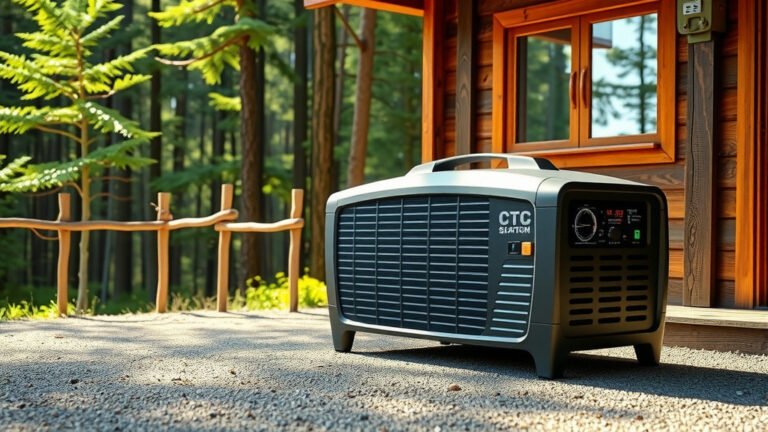
To use a portable power station outdoors, connect your devices to the station’s outlets and charge the unit beforehand using solar panels, AC charging, or car charging.
Position your portable power station on a flat, dry surface away from direct sunlight and moisture for safe outdoor operation.
Quick Setup Guide for Outdoor Use
Getting your portable power station ready for outdoor adventures takes just a few simple steps. You want to make sure everything works smoothly before you’re miles from the nearest outlet.
First, charge your unit completely at home. Think of it like filling up your car’s gas tank before a road trip. You don’t want to discover a dead battery when you need power most.
Essential Pre-Trip Checks
Before heading out, test all your device connections at home. Plug in your phone charger, laptop, and any other gear you plan to use. This helps you spot any compatibility issues early.
Check the weather forecast too. Rain and power stations don’t mix well, so plan for shelter if storms are coming.
Choosing the Right Location
Where you place your power station makes a huge difference in how well it works. The wrong spot can cause overheating, damage, or poor performance.
Ground Surface Requirements
Always set your station on firm, level ground. Uneven surfaces can tip the unit over, potentially damaging ports or internal parts. A picnic table works great if available.
Avoid sandy or dusty areas when possible. Sand gets into vents and can cause overheating problems. If you must use sandy ground, place a tarp or mat underneath first.
Temperature Considerations
Keep your power station in shade whenever you can. Direct sunlight heats up the battery and reduces its lifespan. Many experts say operating temperatures should stay between 32°F and 104°F for best results.
In cold weather, bring the unit inside your tent overnight. Freezing temperatures can damage lithium batteries permanently.
Charging Methods for Outdoor Use
You have three main ways to recharge your portable power station while camping or spending time outdoors. Each method has its own benefits and limitations.
Solar Panel Charging
Solar panels offer the most freedom for extended outdoor trips. You can generate power as long as the sun shines, making them perfect for multi-day adventures.
Position solar panels facing south for maximum sunlight exposure. Tilt them toward the sun at roughly a 30-degree angle. Clean panels work better, so wipe off dust and debris regularly.
Solar Charging Tips
- Start charging early in the morning when panels are cool
- Move panels to follow the sun throughout the day
- Expect slower charging on cloudy days
- Keep spare cables handy in case of damage
Car Charging Options
Your vehicle’s 12V outlet can recharge most portable power stations. This works great for car camping or when you drive between locations.
Car charging typically takes longer than wall outlets but provides steady power. Make sure your engine runs while charging to avoid draining your car battery.
Generator Backup Charging
Small portable generators can recharge power stations quickly when other methods aren’t practical. This option works well for base camps or RV trips.
Run generators during permitted hours only. Many campgrounds have quiet hours when gas generators aren’t allowed.
Device Connection Best Practices
Connecting your devices properly helps prevent damage and maximizes battery life. Different devices have different power needs, so understanding the basics helps a lot.
Power Requirements Planning
Calculate how much power your devices actually need. Your phone might use 10-15 watts, while a small cooler could need 40-60 watts continuously.
Add up all your devices’ power draw. Make sure the total stays below your station’s output capacity. Going over can trigger safety shutoffs or damage equipment.
Common Device Power Usage
| Device | Typical Power Draw | Runtime (500Wh Station) |
|---|---|---|
| Smartphone | 5-10W | 50-100 hours |
| Laptop | 30-65W | 8-17 hours |
| LED Lantern | 5-15W | 33-100 hours |
| Small Fan | 20-40W | 12-25 hours |
| Mini Fridge | 40-80W | 6-12 hours |
Port Selection Guidelines
Use the right port for each device type. USB ports work great for phones and tablets. AC outlets handle laptops and larger appliances. DC ports suit 12V devices like car accessories.
Avoid daisy-chaining power strips or extension cords when possible. Direct connections work more efficiently and reduce fire risk.
Safety Precautions for Outdoor Use
Outdoor environments present unique risks for electronic equipment. Following basic safety rules protects both you and your expensive gear.
Weather Protection Strategies
Water and electronics don’t mix well. Even moisture-resistant power stations can suffer damage from heavy rain or humidity.
Create overhead shelter using tarps, pop-up canopies, or your vehicle. Keep stations at least 3 feet from open flames like campfires or grills.
Emergency Weather Response
If storms approach suddenly, disconnect all devices immediately. Move the power station to the driest available shelter. Turn the unit off completely during lightning storms.
Let wet equipment dry thoroughly before powering it back on. Moisture inside electronics can cause short circuits and permanent damage.
Ventilation Requirements
Power stations generate heat during operation. They need airflow around all sides to prevent overheating and potential fire hazards.
Leave at least 6 inches of space around all vents. Don’t place clothing, gear, or other items on top of the unit while it’s running.
Maximizing Battery Life Outdoors
Smart usage habits can extend your power station’s runtime significantly. Small changes in how you operate devices make a big difference over time.
Energy Conservation Techniques
Turn off devices when you’re not actively using them. That laptop sitting idle still draws 15-30 watts in sleep mode. Completely shutting down saves more power.
Lower screen brightness on phones and tablets. Bright displays use much more battery than dimmed ones. Most devices work fine at 50-60% brightness outdoors.
Smart Charging Schedules
Charge multiple devices during peak solar hours (10 AM to 3 PM). This takes advantage of maximum solar input while minimizing battery drain.
Prioritize essential items first. Charge your phone and safety equipment before powering entertainment devices or convenience items.
Load Management Tips
Avoid running high-power devices simultaneously. Instead of charging your laptop while running a fan, do one at a time. This reduces strain on the battery system.
Use power-saving modes on all electronic devices. Most modern gadgets have eco-friendly settings that reduce energy consumption without major performance loss.
Maintenance While Camping
Basic maintenance keeps your power station working reliably throughout your trip. You don’t need special tools, just common sense care.
Daily Care Routine
Wipe down the exterior each evening with a dry cloth. Remove dust, pollen, and debris that can block vents or damage ports.
Check all cable connections before bed. Loose connections can cause charging problems or device malfunctions.
Storage Between Uses
Store your power station in a cool, dry place when not in use. Inside your vehicle or RV works well, as long as temperatures stay moderate.
Keep the battery charge between 50-80% during storage. This range helps maintain battery health over time.
Troubleshooting Common Outdoor Issues
Problems happen, even with the best equipment and planning. Knowing how to handle common issues keeps your outdoor adventures running smoothly.
Power Output Problems
If your power station won’t charge devices, check connections first. Corrosion from humidity can block electrical contact. Clean ports gently with a dry toothbrush if needed.
Overheating triggers automatic shutdowns on most units. Move the station to a cooler, shadier location and wait 15-30 minutes before restarting.
Solar Charging Failures
When solar panels aren’t charging properly, inspect cables for damage first. Animals sometimes chew on wires, and rocks can cut insulation.
Clean panel surfaces with water and a soft cloth. Even thin layers of dust can reduce charging efficiency by 20% or more.
Display and Control Issues
Frozen or unresponsive displays usually clear up with a power cycle. Turn the unit completely off, wait 30 seconds, then restart.
If buttons don’t respond normally, check for moisture or debris around the controls. Light cleaning with a barely damp cloth often fixes sticky buttons.
Conclusion
Using a portable power station outdoors opens up amazing possibilities for extended adventures while keeping your essential devices powered. The key is proper preparation, smart placement, and basic safety awareness.
Start with a fully charged unit, choose the right location away from extreme weather, and plan your device usage around available power. With good habits and regular maintenance, your portable power station will provide reliable electricity for many outdoor trips to come.
Remember that practice makes perfect. Try your setup at home first, then start with shorter trips to build confidence. Soon you’ll be powering multi-day adventures with ease and enjoying the freedom that portable power provides.
Can I leave my portable power station outside overnight while camping?
You can leave it outside if temperatures stay above freezing and you protect it from rain and heavy dew. Bring it inside your tent or vehicle in freezing weather to prevent battery damage. Always use a waterproof cover or shelter during wet conditions.
How do I know if my power station is getting too hot in the sun?
Most units have built-in temperature warnings that appear on the display or trigger automatic shutdowns. If the case feels too hot to touch comfortably, move it to shade immediately. Look for error codes or blinking lights that indicate overheating conditions.
What should I do if my solar panels aren’t charging the power station properly?
Check cable connections first, then clean the panel surfaces with water and a soft cloth. Make sure panels face south and aren’t shaded by trees or equipment. Verify that your panels match the power station’s input requirements for voltage and amperage.
Is it safe to use a portable power station inside my tent?
Yes, but ensure adequate ventilation around all sides of the unit and never cover the vents. Keep it away from sleeping areas and flammable materials. Turn it off completely if you smell anything unusual or notice excessive heat buildup.
How often should I clean my portable power station during outdoor use?
Wipe down the exterior daily with a dry cloth to remove dust and debris. Clean the ports weekly or whenever you notice buildup. After dusty or sandy conditions, clean immediately to prevent particles from entering vents or damaging connections.