How to Use NOCO GENIUS10 Repair Mode
NOCO GENIUS10 Repair Mode is for attempting to recover certain weak or damaged lead-acid batteries. Use it only when the battery type and condition fit the charger manual, and stop if the battery is cracked, leaking, swollen, or hot.
On this page (7 sections)
- What does NOCO GENIUS10 Repair Mode do?
- When is GENIUS10 Repair Mode appropriate?
- How do you use NOCO GENIUS10 Repair Mode safely?
- What should you check before starting a recovery attempt?
- What should you do after using Repair Mode?
- What if GENIUS10 Repair Mode doesn’t work?
- Which charger fits the next step?
NOCO GENIUS10 Repair Mode is intended to attempt recovery of certain weak or damaged lead-acid batteries. Use it only when the battery type and condition fit the charger manual, and stop if the battery is cracked, leaking, swollen, frozen, or hot.
Repair mode is not a normal charging step or a guarantee that a battery can be restored. It can’t reverse every cause of failure, and an old battery may still need replacement after a recovery attempt.
What does NOCO GENIUS10 Repair Mode do?
Repair Mode runs a recovery process for some batteries that have lost performance. The GENIUS10 manual is the authority on which batteries and conditions it supports, so check it before choosing the mode.
Lead-acid batteries can lose capacity as they age or sit discharged. Sulfation is one possible cause, but a battery can also fail from physical damage, wear, freezing, or an internal fault.
A recovery setting may help with some cases, but it cannot rebuild worn parts or make a damaged battery safe. If the battery case is bulging, cracked, leaking, or unusually hot, disconnect power if you can do so safely and stop.
If you’re still identifying the battery chemistry and use, start with what a deep-cycle battery is. Battery type matters because a charger mode meant for one chemistry may not suit another.
When is GENIUS10 Repair Mode appropriate?
Consider Repair Mode only for a compatible lead-acid battery with a charging or performance problem. Confirm the battery type and the mode’s limits in the current NOCO manual before connecting the charger.
A battery that has been idle or discharged may be a candidate if it has no signs of damage and the manual’s requirements are met. A brief diagnostic or repair attempt may help determine whether it can accept charge, but a successful mode cycle doesn’t prove the battery will hold charge under load.
Don’t use repair mode as a substitute for routine charging. For maintenance, choose the charger mode intended for the battery and follow the manufacturer’s connection instructions.
Is repair mode for every weak battery?
No, a weak battery isn’t automatically a suitable repair-mode battery. A battery may be weak because it’s worn out, physically damaged, deeply discharged, or affected by a vehicle charging problem.
Do not proceed if the battery is frozen, cracked, leaking, swollen, or hot. Follow the GENIUS10 and battery manuals for any additional warnings, ventilation needs, connection steps, and time limits.
If you suspect the battery is damaged or the cause is unclear, have it checked by a qualified battery shop. If you need a jump-start rather than a charging recovery attempt, read whether a NOCO GENIUS10 can jump-start a car.
How do you use NOCO GENIUS10 Repair Mode safely?
Follow the GENIUS10 manual step by step, using Repair Mode only after confirming the battery is suitable. The exact setup and sequence can depend on the battery, charger version, and how it’s connected.
A cautious process looks like this:
- Read the charger manual and battery instructions.
- Confirm the battery chemistry, voltage, and condition.
- Work in a ventilated area away from sparks and flames.
- Inspect the case, terminals, and cables for damage.
- Connect the charger exactly as instructed while power is off.
- Select the mode and allow only the manual’s stated process.
- Stop if the battery becomes hot, leaks, swells, or makes unusual sounds.
- Disconnect the charger as directed and assess whether the battery holds charge.
Wear eye protection and keep metal tools away from battery terminals. Lead-acid batteries can release gas during charging, so keep the area ventilated and avoid smoking or creating sparks nearby.
Don’t assume a particular button sequence, voltage threshold, or cycle length from another NOCO model. The GENIUS10 manual has the instructions for this charger.
What should you check before starting a recovery attempt?
Check battery chemistry, damage, state of charge, and the charger manual first. These checks help rule out cases where repair mode is unsuitable or where a different problem needs attention.
Look at the battery label to identify whether it’s lead-acid, AGM, gel, flooded, or another type. Then confirm the GENIUS10 manual supports that battery type in Repair Mode.
Inspect the case and terminals before connecting anything. Stop if you see a crack, leaking fluid, swelling, corrosion that prevents a sound connection, or signs of heat damage.
If the battery is installed in a vehicle, follow the vehicle manual for charging and disconnection. Some vehicles have sensitive electronics or specific connection points.
Can Repair Mode be used on AGM batteries?
Use Repair Mode on AGM batteries only if the GENIUS10 manual clearly allows it for your setup. AGM is a lead-acid battery type, but that does not mean every recovery mode is suitable for every AGM battery.
See what AGM means on a charger for more on its charging profile.
Use the charger’s normal AGM or lead-acid charging instructions when repair mode is not recommended. For vehicle applications, compare AGM car battery chargers.
For help comparing compatible chargers, see our guide to the best AGM battery charger.
What should you do after using Repair Mode?
Check whether the battery holds charge and performs normally after the charger’s process ends. A mode completion alone doesn’t confirm that the battery is reliable.
Use a suitable battery tester or ask a shop to test it under load. If the battery quickly loses charge, struggles to start equipment, or fails the test, replacement may be the safer choice.
If it passes a check, keep it charged according to the battery maker’s guidance. Don’t leave it connected indefinitely unless the charger and battery instructions allow that use.
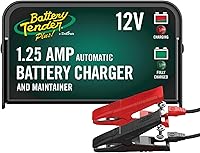
For less demanding charging and maintenance needs, the Battery Tender Plus is a 12V, 1.25A charger with a 4-step charging program and fused ring terminal and alligator clip cables.
This charger is for charging and maintaining a compatible 12V battery, not a replacement for a repair-mode attempt on the GENIUS10. Check your battery type and charging needs before choosing a different unit.
What if GENIUS10 Repair Mode doesn’t work?
Stop after the manual’s repair process and investigate why the battery still won’t hold charge. Repeating recovery attempts without a clear reason can waste time and may be unsafe if the battery is damaged.
Check that the charger connections were correct and that the battery is a supported type. If it still fails, have the battery tested or contact the battery manufacturer.
If the battery passes testing but needs a different charger for ordinary charging, compare the best NOCO AGM battery chargers and best NOCO Genius battery chargers for options suited to your battery type and use.
For a lower-current charger that supports 6V and 12V lead-acid batteries, the NOCO GENIUS1 offers 1A charging and maintenance.
The GENIUS1 is a separate charger and does not provide a GENIUS10 Repair Mode workflow. Choose it for compatible charging and maintenance needs, not as a guaranteed way to recover a failed battery.
Which charger fits the next step?
Use the GENIUS10 Repair Mode only when its manual and your battery’s condition support it. For everyday charging, choose a charger whose battery compatibility and output match your needs.
The TowerTop charger provides 2A, 10A, 25A, and automatic current settings for compatible 12V lead-acid batteries, including AGM, gel, and deep-cycle types. Its maker describes separate desulfation and repair controls, but that does not mean it can recover every failed battery.
Choose a routine charger for a battery that needs charging or maintenance, and repair mode only for a supported recovery case. If the battery is damaged, fails testing, or won’t hold charge after a manual-approved attempt, ask a qualified shop about testing or replacement.
For the noco genius 10 repair question, the decision is simple: check compatibility and condition first, follow the GENIUS10 manual, and stop if the battery shows damage or heat. Repair mode may help some lead-acid batteries, but it can’t restore every weak battery or make an unsafe one usable.
Frequently asked questions
What does NOCO GENIUS10 Repair Mode do?
Repair Mode applies a recovery process intended to help with some weak or damaged lead-acid batteries. It can't restore every battery, and it isn't a routine charging setting.
Check the GENIUS10 manual for supported battery types, setup, and time limits, then stop if the battery becomes hot or shows physical damage.
When should I use NOCO GENIUS10 Repair Mode?
Consider it only when a compatible lead-acid battery has a charging problem and the manual indicates repair mode may be appropriate. It isn't a fix for a cracked, leaking, frozen, swollen, or otherwise unsafe battery.
For a vehicle battery, disconnect it and work in a ventilated area as the vehicle and charger manuals direct.
Can NOCO GENIUS10 Repair Mode fix a dead battery?
It may help recover some batteries with sulfation or similar loss of performance, but it can't make a worn-out or internally damaged battery new again. A battery that won't hold a charge after the attempt may need professional testing or replacement.
Don't keep repeating recovery cycles without checking the charger and battery instructions.
Can I use Repair Mode on an AGM battery?
Use Repair Mode on an AGM battery only if the current GENIUS10 manual explicitly allows it for your battery and setup. AGM is a lead-acid type, but battery designs and charger modes differ.
If the manual doesn't clearly cover the case, use the regular mode specified for that battery or ask the battery maker.