How to Charge a Portable Power Station from a Wall Outlet?
On this page (3 sections)
To charge a portable power station from a wall outlet, you simply connect it using the AC adapter provided by the manufacturer. Plug the adapter into your power station, then into a standard 120V wall socket. The charging process usually begins automatically.
This method is the most common and convenient way to recharge your device, ensuring it’s ready for your next adventure or power outage. Most power stations come with everything you need, so you won’t have to buy extra gear. It’s a reliable way to keep your portable power station topped off and ready to go.
- Connect the AC adapter.
- Plug into a wall outlet.
- Charging starts automatically.
- It’s the easiest charging method.
Let’s walk through exactly how this works, step by step, ensuring your power station is always ready when you need it.
Plugging In: Charging Your Power Station From Home
Charging your portable power station from a standard wall outlet is the most straightforward and reliable method to keep your device ready. For those interested in using their device during outages, our guide on how to use a portable power station for home backup provides comprehensive instructions.
Think of it like charging your smartphone, but on a larger scale. You’re using your home’s electrical grid to fill up your power station’s battery.
Most portable power stations are designed with this primary charging method in mind. It’s safe, efficient, and requires minimal effort on your part.
Understanding Your AC Charging Cable
Every portable power station comes with a specific charging cable designed for wall outlets. This cable usually consists of two main parts: the AC adapter and the power cord itself.
The AC adapter is often a brick-like component that converts the alternating current (AC) from your wall into the direct current (DC) your power station needs. Some newer, smaller power stations integrate this adapter directly into the unit.
The power cord typically has a standard two or three-prong plug on one end for your wall outlet and connects to the adapter or directly into your power station on the other.
Always use the cable that came with your specific power station. Using third-party chargers might not provide the correct voltage or amperage, potentially harming your device or slowing down charging (National Electrical Code).
Step-by-Step Wall Charging Process
Charging your power station from a wall outlet is a breeze. Let’s walk through it together.
Check Your Power Station’s Requirements
Before you plug anything in, take a quick look at your power station’s manual or the charging port itself. You’ll usually find information on the input voltage and current.
Most power stations accept standard household 120V AC power in the US. Some larger units might require a dedicated circuit, but this is rare for typical portable models.
Ensure your wall outlet is in good working order. Avoid using outlets that are loose or appear damaged.
Connect the AC Adapter to Your Power Station
Locate the AC input port on your portable power station. It’s usually clearly labeled. It might look like a standard figure-8 connector or a specialized round port.
Gently but firmly insert the power cable from the AC adapter into this port. You should feel a secure connection.
If your power station has an integrated adapter, simply connect the power cord directly to the unit.
Plug into a Wall Outlet
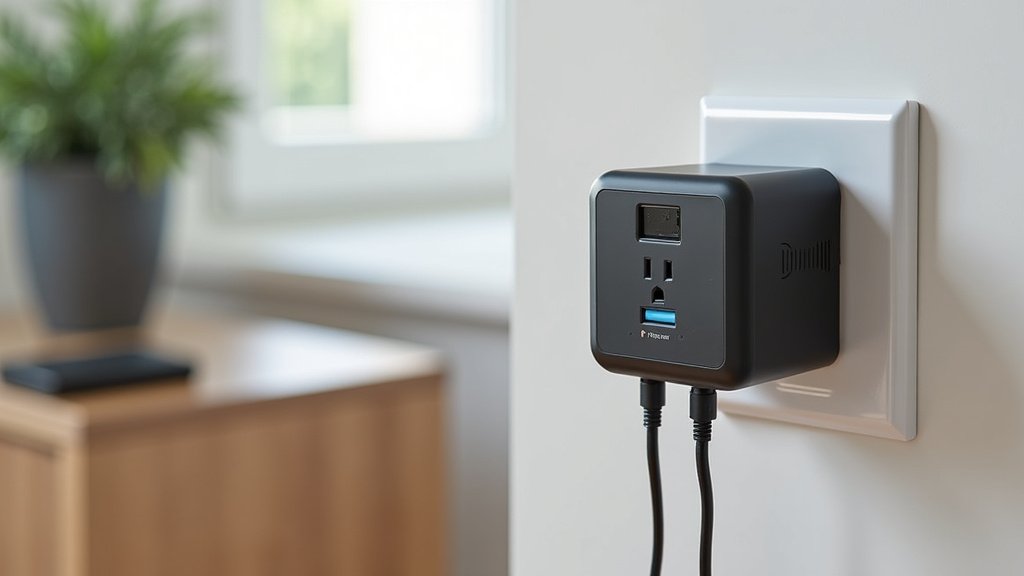
Now, take the other end of the power cord – the one with the standard wall plug – and insert it into a working 120V AC wall outlet.
Avoid using extension cords if possible. If you must use one, make sure it’s a heavy-duty, grounded extension cord rated for the power draw of your device (Underwriters Laboratories).
For safety, plug the power station end in first, then the wall end. This minimizes any potential arcing at the wall socket.
Verify Charging Indicator
Once plugged in, your portable power station should indicate that it’s charging. This is often displayed as a flashing battery icon, a percentage increase, or a dedicated “charging” light.
If you don’t see any indication, double-check all connections. Make sure the wall outlet is active by testing it with another device, like a lamp.
Refer to your power station’s user manual for specific details on how it displays charging status.
Monitor and Disconnect
Allow your power station to charge completely. Most units have circuitry that prevents overcharging, so you don’t need to constantly watch it. For more details on battery management systems and safety features, our guide on whether it is safe to leave them plugged in overnight offers further insights.
However, it’s a good practice to occasionally check on the progress. Once fully charged, the indicator will usually change to a solid “100%” or a steady light.
When charging is complete, disconnect the power cord from the wall outlet first, then from your power station. This is a best practice for safety and device longevity.
How Long Does Wall Charging Take?
The time it takes to fully charge your portable power station from a wall outlet varies significantly based on several factors.
Generally, smaller power stations (under 500 Wh capacity) might charge in 2-4 hours. Larger units (over 1000 Wh) could take 6-10 hours or even longer.
We found that battery capacity is the biggest factor. A higher Watt-hour (Wh) rating means more energy needs to be stored, hence longer charging times.
Another factor is the input wattage of your power station’s AC adapter. A 100W input will charge slower than a 200W input, assuming the same battery capacity.
Many modern power stations feature fast-charging technology, which can significantly reduce charging times. Always check your specific model’s specifications.
| Power Station Capacity (Wh) | Typical Wall Charging Time (Hours) | Notes |
|---|---|---|
| Under 300 Wh | 2 – 4 hours | Great for small devices, quick top-ups. |
| 300 – 1000 Wh | 4 – 8 hours | Mid-range, good for camping or short outages. |
| Over 1000 Wh | 8 – 12+ hours | Larger capacity, for extended use or whole-home backup. |
These are general estimates. Always consult your user manual for precise charging times for your specific model.
Optimizing Your Wall Charging Experience
While charging from a wall outlet is simple, a few tips can enhance the experience and prolong the life of your power station.
- Keep it cool: Charge your power station in a well-ventilated area. Extreme heat can slow down charging and stress the battery.
- Avoid deep discharge: Try not to let your power station completely drain before recharging. While not always harmful, frequently running the battery to 0% can reduce its overall lifespan over time (Battery University).
- Regular top-offs: It’s generally better for lithium-ion batteries to be kept partially charged rather than fully discharged and recharged. Regular top-offs are good.
- Use the original charger: As mentioned, always stick with the manufacturer’s provided AC adapter and cable.
- Store properly: If storing your power station for an extended period, charge it to about 50-80% before putting it away.
Troubleshooting Common Charging Issues
Sometimes, things don’t go as planned. If your portable power station isn’t charging from the wall outlet, here’s a quick checklist:
- Is the wall outlet working? Test it with another device.
- Are all connections secure? Wiggle the plugs gently to ensure they’re fully seated.
- Is the AC adapter functioning? Check for any indicator lights on the adapter itself.
- Is the power station turned on? Some models require being powered on to accept a charge.
- Is the cable damaged? Look for frayed wires or bent pins on the connectors.
- Is the temperature too extreme? Some power stations won’t charge if they are too hot or too cold.
If you’ve checked these points and it’s still not charging, it might be time to contact the manufacturer’s customer support. They can provide specific diagnostics for your model.
Conclusion
You’ve now got the full picture on charging your portable power station from a wall outlet. It’s the simplest and most reliable method to keep your device powered up and ready for anything. By using the right cable, following a few easy steps, and understanding your unit’s charging habits, you ensure longevity and peak performance. Keep these tips in mind, and you’ll always have reliable power at your fingertips.
So go ahead, plug in, and get ready for your next adventure or peace of mind during an outage!
Frequently Asked Questions
Can I leave my portable power station plugged into a wall outlet all the time?
Most modern portable power stations have advanced battery management systems that prevent overcharging. It’s generally safe to leave them plugged in, especially if they have a “pass-through” charging feature. However, for long-term storage, some manufacturers recommend charging to 50-80% and unplugging.
Will charging my power station from a wall outlet use a lot of electricity?
Charging a portable power station does consume electricity, but the cost is usually minimal. The amount depends on the battery capacity and your local electricity rates. Compared to the convenience and utility it provides, the energy cost is typically very low.
What if my power station is charging very slowly from the wall?
Slow charging could be due to several factors. First, ensure you’re using the original AC adapter. Check if the input wattage of your adapter is lower than what your power station can handle. Extreme temperatures can also slow down charging, or your unit might be in a “trickle charge” phase as it approaches full capacity.
Can I use any extension cord to charge my portable power station?
No, it’s best to avoid extension cords if possible. If you must use one, make sure it’s a heavy-duty, grounded cord rated for the power draw of your power station. Using a flimsy or underrated extension cord can lead to overheating and potential fire hazards.
Is it safe to charge my power station indoors from a wall outlet?
Yes, it is generally safe to charge your portable power station indoors from a wall outlet. Always ensure it’s in a well-ventilated area and not covered. Avoid charging near flammable materials. If you notice any unusual smells, sounds, or excessive heat, disconnect it immediately and contact the manufacturer.